
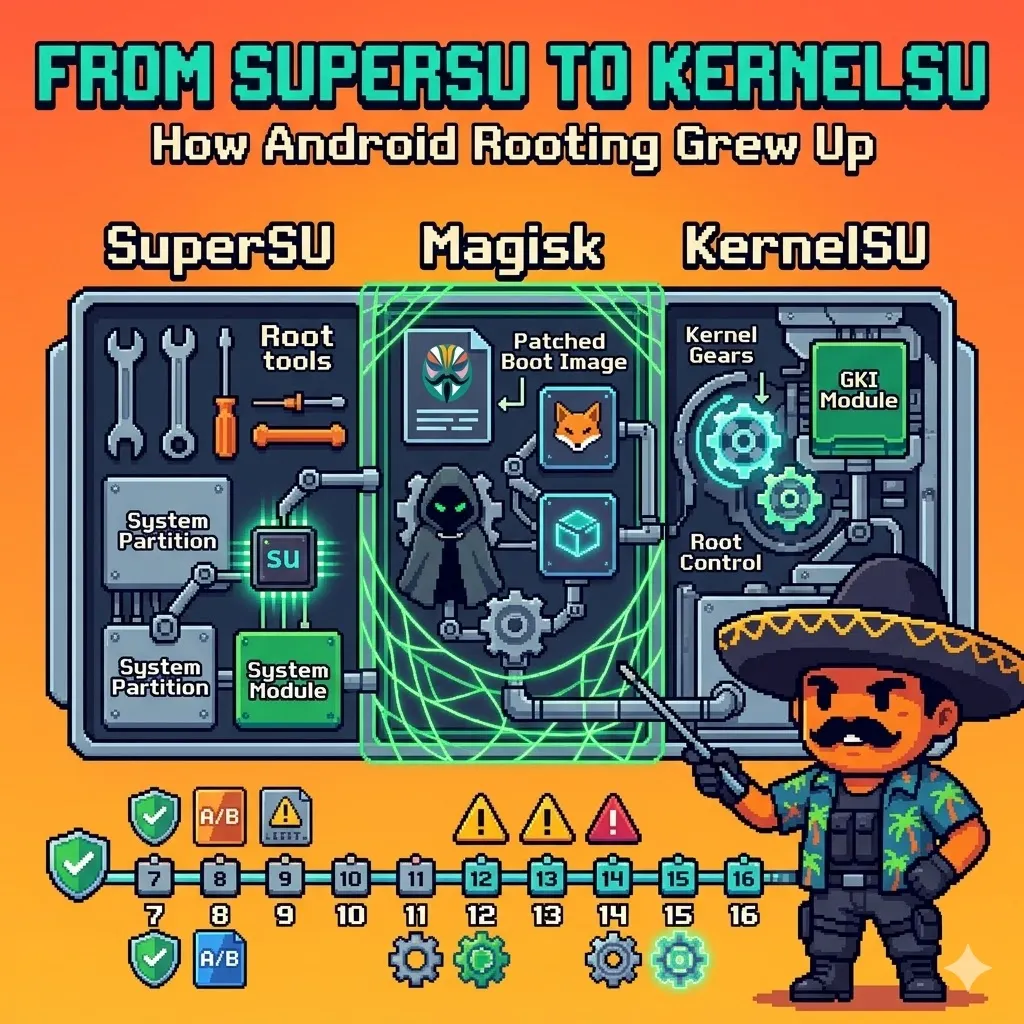
Android root did not just change tools. It changed philosophy
There was a time when rooting an Android phone felt almost simple. You unlocked the bootloader, flashed a ZIP, installed SuperSU, and suddenly your phone felt like it truly belonged to you. You could block ads system-wide, remove bloatware, back up everything, tweak performance, and install mods that made stock Android feel limited by comparison.
TIPRoot is Android’s highest privilege level, giving you administrator access to protected parts of the system.
That version of root is mostly gone now. Not because people lost interest, but because Android itself grew up. Over the years, Google added stronger security, stricter partition layouts, Verified Boot, seamless updates, and app-side integrity checks that made old-school rooting less practical than it used to be.
So root had to evolve too. It moved from SuperSU’s direct system modifications, to Magisk’s systemless and modular approach, and now to KernelSU’s kernel-based model that feels like the next chapter in Android modding.
This is the story of how we got from simple /system edits to modern root living closer to the kernel, but how does not like kernels anyway? :“D.
When root felt simple
In the early Android years, root meant exactly what most people imagined: superuser access to the Linux-based system underneath Android. If you had root, you had control over parts of the device that normal apps could never touch.
That mattered more back then because stock Android was far more limited. Many features people now take for granted either did not exist yet or worked badly enough that power users immediately looked for better alternatives. Root was how people unlocked that extra layer of control.
NOTEFor many users, rooting was not about “hacking” the phone in a dramatic sense. It was about ownership. If you bought the device, you wanted the freedom to shape it however you wanted.
Some rooted to run full backup tools. Others wanted better ad blocking, stronger automation, CPU tuning, custom kernels, or full custom ROMs. In that era, root felt less like a niche experiment and more like a natural next step for Android enthusiasts.
The SuperSU era
If Android rooting had a face for many years, it was SuperSU. Created by Chainfire, SuperSU became the familiar gatekeeper between apps and privileged access. When an app asked for root, SuperSU was the prompt most people saw.
What made SuperSU important was not just that it granted root. It made root management feel organized and accessible. Users could allow or deny requests, review logs, and manage which apps had access without digging through low-level scripts every time.
SuperSU works by installing a su binary and root manager, usually through direct system or boot modifications, then granting or denying root requests from apps.
WARNINGA huge fallback for the old root method su is that it directly changes the
systempartition.
Under the hood, though, the old model was much rougher than it looked. Traditional root often meant modifying the system partition directly, dropping su into places Android did not originally expect, and making permanent changes to the software layout. It worked well for the Android of that time, but it also meant updates could break more easily and the system was no longer “clean” in the eyes of newer security checks.
IMPORTANTSuperSU represented an era when root was direct, powerful, and a little messy. It matched the Android world it came from.
Android started pushing back
As Android matured, Google began tightening the platform in ways that changed the rooting scene completely. Features like Verified Boot, dm-verity, stronger SELinux enforcement, and later integrity attestation made it much harder to treat Android like a loosely protected Linux playground.
This was not just about blocking enthusiasts. It was also about protecting users from tampering, persistent malware, and broken update chains. But for the rooting community, the effect was obvious: the old “flash and enjoy” model was fading fast.
WARNINGAndroid 7 marked a particularly important point in that shift. From there on, rooting became less about modifying Android directly and more about working around an increasingly hardened system design.
That change continued through newer versions as partition schemes became more complex and seamless A/B updates made persistent modifications harder to maintain cleanly. Root did not die, but it stopped being casual.
You can read more about it here
Magisk changed the game
Then Magisk arrived, and for a lot of people, it felt revolutionary. It did not just offer root access; it changed the way people thought about root on Android.
Magisk's key idea was “systemless” root. Instead of directly modifying /system in the old way, Magisk focused on patching the boot image and applying changes more cleanly at runtime. That made rooting feel smarter, more flexible, and better suited to modern Android’s restrictions.
TIPMagisk works by patching the boot image to provide systemless root, so apps get su access without directly changing the system partition.
This was a huge mindset shift. SuperSU belonged to the era of direct modification, while Magisk belonged to the era of adaptation. It accepted that Android had changed and built a model that could survive in that new reality.
Magisk also became more than a root solution. It turned into a platform. With modules, better management tools, and later features like Zygisk, it gave users a modular way to customize devices without treating every change aka runtime like a permanent surgery on the operating system.
Some Important Concepts
Systemless root is a way to get
rooton Android without directly modifying the/systempartition; instead, it usually works by patching the boot image so root is injected during startup runtime.
and how does that happen? well, meet Zygote
Zygote is a core Android process that acts as the root of app and system processes for a given ABI. When Android needs to start an app, the system asks Zygote, and Zygote forks a new process (PID) from its preloaded state instead of building everything from scratch. That design makes app startup faster because common classes, libraries, and runtime resources are already loaded.
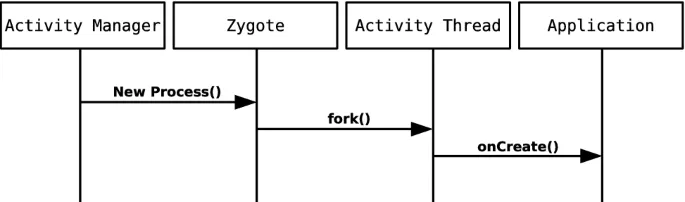
So does the community leaves it alone? nah, too boring, meet Zygisk
Zygisk is a Magisk feature that integrates Magisk modules and root-related behavior directly into the Zygote process. It showed up because older root-hiding approaches like MagiskHide were becoming less reliable as Google’s SafetyNet and later stronger checks got harder to spoof, so Magisk moved to a deeper and more proactive model.
How Zygisk relates to Zygote?
The name basically tells the story: Zygisk = Magisk + Zygote. Zygisk works by hooking into Zygote, which matters because nearly every Android app process is forked from Zygote, so anything loaded there can influence app processes very early. That is why Zygisk became important for advanced modules and app-level behavior: it sits at a strategic point in Android’s process creation flow rather than acting only later from normal userspace.
Android Train Stations
Android 7 to Android 10: the transition years
This was the era where traditional root methods started colliding with Android’s new security architecture. Verified Boot and dm-verity mattered much more now, which meant the system could actively check whether critical partitions such as /system still matched a known-good state during boot. On locked devices, persistent changes to /system were no longer something Android would casually tolerate, and that made classic “modify the system partition and forget about it” rooting far less reliable.
At the same time, Android’s partition model was changing. A/B partitions and seamless updates meant the phone was no longer updating the currently running slot in place; instead, it patched the inactive slot and switched over on reboot. That sounds cleaner for users, but it complicated root because your changes could be overwritten by the newly prepared slot unless your root method understood how to survive that update flow.
This is also why Magisk fit the moment so well. Instead of treating root as a permanent edit inside /system, Magisk leaned into a systemless model by patching the boot image and applying modifications at runtime, leaving the actual system partition largely untouched.
IMPORTANTIn practical terms, that made rooting more compatible with modern Android’s verified partitions,
OTAbehavior, and tighter integrity checks.
So for users, root still looked alive on the surface, but behind the scenes it had become more strategic. You were no longer just editing Android’s files; you were negotiating with boot verification, partition layouts, and an operating system that now assumed tamper resistance by default.
Android 11 to Android 13: pressure everywhere
By Android 11 through Android 13, root itself was not the hard part anymore. The harder part was keeping the rooted phone usable in the real world, especially when apps started caring about whether the device looked modified. This is where SafetyNet’s earlier role gave way to the stronger Play Integrity model, and that shift made life harder for rooted users because sensitive apps could use those signals to decide whether to run at all.
That is why this era felt different from the earlier Magisk years. Root was still technically possible, but the ecosystem around the phone had become suspicious of it. Banking apps, payment apps, some corporate management tools, and even games increasingly treated root as a red flag, which meant the question was no longer “Can I root?” but “Can I root and still keep everything working?”
Under the hood, this created an entire workflow culture around root maintenance. Users had to think about OTA survival, root hiding, deny lists, module compatibility, and whether app-side checks were looking only at basic integrity signals or at deeper signs of modification. Magisk evolved in this period not just as a root solution, but as a framework for managing that tension between modification and detection.
This also changed the audience. Casual users started dropping off because the reward was no longer always worth the friction, while the people who stayed were more likely to be developers, ROM maintainers, modders, and security researchers who were comfortable managing boot images, modules, and integrity workarounds as part of normal device use.
CAUTIONThis was the point where root stopped feeling mainstream and started feeling specialized. It was still powerful, but it increasingly belonged to people who understood Android’s security model well enough to work around it without constantly breaking their own setup.
Android 14 to Android 16: a new phase
On modern Android, rooting feels less like a simple customization trick and more like a deliberate low-level engineering choice. The platform now combines stronger boot-chain verification, enforced SELinux policies, modern partition/update behavior, and app-side integrity enforcement into a much tighter security story than older Android ever had.
That matters because the old reasons many people rooted for are not as compelling anymore. Android and OEM builds already provide many features that once required root, so the users who still care are usually the ones chasing things stock Android still cannot offer: deep system control, advanced instrumentation, kernel experimentation, research workflows, or highly customized environments.
This is exactly why KernelSU gets attention now. It represents a shift from “root as a userspace patching trick” toward “root as a capability managed closer to the kernel layer,” which fits the broader direction of modern Android, especially as GKI and kernel standardization become more important.
As Android kept locking down the upper layers, the root scene started moving deeper rather than disappearing.
That is what makes this phase interesting. Root is more niche than before, but it is also more technically mature. SuperSU belonged to the era of direct system modification, Magisk belonged to the era of systemless adaptation, and KernelSU belongs to an era where the most interesting place to rethink root is no longer /system, but the kernel itself.
Why KernelSU feels different
KernelSU works by moving root handling into the kernel itself, so root access is managed at kernel level instead of mainly through userspace boot patches.
KernelSU’s core idea is simple but important: it runs inside the Linux kernel, not only in userspace. That means root access can be enforced at the same layer that already controls processes, credentials, syscalls, and security decisions.
KernelSU stands out because it approaches root from a different layer. Instead of living mainly in the same model Magisk popularized, it brings root control closer to the kernel itself.
WARNINGThat may sound like a small technical detail, but philosophically it is a big deal.
That is why KernelSU feels exciting even to people who already know Magisk well. It is not just another root manager with a different interface. It suggests a different future for root on newer Android devices, especially in a world shaped by GKI, modern kernels, and tighter platform design.
It also matches the direction Android itself has taken. As the platform became more standardized and more locked down in user space, root naturally started moving deeper.
NOTEGKI (Generic Kernel Image) —
Google’sstandardized base kernel project, designed to reduce kernel fragmentation by keeping a common core kernel and moving device-specific pieces like SoC and board support into separate loadable modules.LKM (Loadable Kernel Module) — a kernel module, usually a
.kofile, that can be loaded into a running kernel to add functionality without rebuilding the whole kernel.
In KernelSU discussions, GKI mode usually means replacing the device’s original kernel with a KernelSU-provided generic kernel image, while LKM mode means keeping the stock kernel and loading KernelSU as a loadable kernel module instead. That is why people compare “GKI vs LKM” in rooting guides, even though technically one is a kernel image model and the other is a module-loading approach.
Artifacts
This kernel-level design also changes the detection story. Because KernelSU does not rely on the same userspace flow as Magisk, and does not depend in the same way on boot-image patching plus Zygisk-style app-process integration, it can avoid some of the artifacts that older root detection logic was built to look for.
IMPORTANTIn practical terms, that means some apps and detection libraries may have a harder time spotting the familiar signs of traditional systemless root, because the privilege logic lives deeper in the kernel rather than mainly in userspace.
But that does not make KernelSU invisible. Modern detection can still look at device integrity signals, bootloader state, kernel anomalies, SELinux behavior, or other signs that the environment is modified.
Closing: Is root still worth it?
That depends on who you are.
For average users, probably less than before. Android and OEM skins now include many features that once made root feel essential, and the tradeoffs are heavier when app compatibility and integrity checks enter the picture.
But for enthusiasts, developers, mobile tinkerers, kernel hackers, and security researchers, root still matters a lot. In some ways, it matters even more now because modern Android is a far more interesting system to study, test, and bend than the simpler Android builds of the past.
That is what makes the current moment so interesting. Rooting is no longer mainstream, but it is still evolving.
TIPIf you are a security researcher, then you already know the answer :’D.
And when you look at the journey from Android 7 to Android 16, that evolution makes perfect sense: every time Android got smarter, root had to get smarter too.
Rooting was never only about getting admin access. It was always about control, experimentation, and the urge to push Android beyond the limits of its default design. That is why the story still matters today.
But for you, is the hassle really worth it?